Input Schema
Defining the input parameters for your code
When you add a task you have an optional schema field. If you leave it blank, Kriten will accept any extra_vars input without validation. The schema allows you to specify the available input fields, and if they are optional or required. Kriten will validate input arguments against the schema before running the task.
For example, your task requires a message field:
{
  "description": "Print a message",
  "properties": {
    "message": {
      "minLength": 1,
      "type": "string"
    }
  },
  "required": [
    "message"
  ]
}
Input schema conforms to the Open API v2 specification.
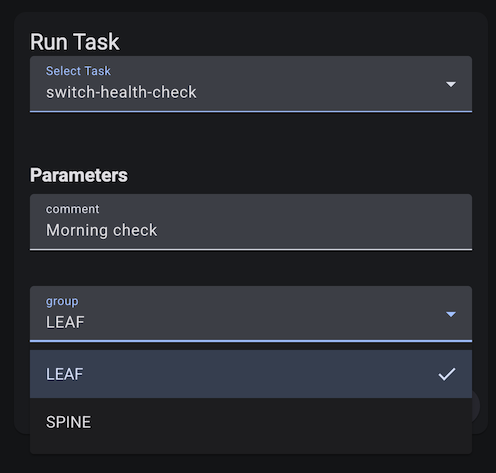
Kriten renders input fields in the run window according to the schema.
For example, task requires two fields, one text and one dropdown:
{
  "description": "Switch health check",
  "properties": {
    "group": {
      "enum": [
        "LEAF",
        "SPINE"
      ],
      "type": "string"
    },
    "comment": {
      "type": "string"
    }
  },
  "required": [
    "group",
    "comment"
  ]
}